

7 Best WordPress Push Notification Plugins in 2026 (Free and Paid)
In this article

A push notification plugin lets your WordPress site collect subscribers and send them browser notifications about new posts, offers and order updates. There are plenty to choose from, and the differences only show up once your audience grows.
We looked at seven plugins that are available on WordPress.org. Full disclosure: we make Push Agent, one of them. The free plans and prices below come from each provider’s own pages and were checked in October 2026.
How we compared them
- Free plan: subscriber limit and sending limits.
- Price as you grow: the first paid plan and what it includes.
- WordPress fit: setup inside wp-admin, sending new posts automatically, and the service worker set up for you.
- WooCommerce: order updates and shop automations.
- Hosting: whether sending runs on the provider’s servers or on your own.
WordPress push notification plugins at a glance
| Plugin | Free plan | First paid plan | Best for |
|---|---|---|---|
| Push Agent | 2,500 subscribers, unlimited notifications | $9/month ($7 billed yearly) | Blogs and WooCommerce shops that want it simple |
| OneSignal | Unlimited web subscribers, up to 10,000 per send | $19/month plus usage | Teams that also need app push and email |
| Webpushr | Up to 10,000 subscribers | $29/month | Large free allowance |
| PushEngage | 200 subscribers, 30 notifications | From $9/month in year one, billed yearly | Stores that want many automations |
| PushAlert | 3,000 subscribers | $12/month | Shop automations on higher plans |
| iZooto | Free plan funded by sponsored notifications | Paid plans for publishers | News and media publishers |
| Perfecty Push | Free and open source | None, you host it | Developers who want to self-host |
1. Push Agent
The Push Agent plugin connects your site with an access token, adds the opt-in card and creates the service worker file in your site’s root folder for you. A dashboard inside WordPress shows your subscribers, your plan, a setup checklist and a health check, with quick links to send a notification and check your campaign results.

- Free plan: 2,500 subscribers on one site, unlimited notifications.
- Growth ($19/month): A/B testing, automatic sending of new posts (RSS), WooCommerce order updates and the REST API.
- No Firebase setup: it uses standard Web Push.
- Also available for Joomla, and as one line of code for any website.
Keep in mind: it focuses on web push only, without email or SMS, and the free subscriber limit is lower than OneSignal’s or Webpushr’s.
2. OneSignal
OneSignal is the most widely used push service, and its WordPress plugin is easy to set up. The free plan has no cap on web subscribers, but each send reaches up to 10,000 of them. It also covers mobile app push, email and SMS.
Keep in mind: it’s a big platform, which is more than many WordPress sites need, and paid pricing mixes a monthly fee with usage.
3. Webpushr
Webpushr gives you up to 10,000 subscribers for free, and says all features are included on every plan. Paid plans start at $29 a month for 50,000 subscribers.
Keep in mind: the first paid step is a bigger jump than most.
4. PushEngage
PushEngage is built with WordPress and WooCommerce in mind and offers many automations. The free plan (200 subscribers and 30 notifications) is mainly for trying it out.
Keep in mind: most sites will need a paid plan from the start.
5. PushAlert
PushAlert has a 3,000-subscriber free plan with unlimited notifications. Paid plans start at $12 a month, and higher tiers add A/B testing and shop alerts such as abandoned cart, price drop and back in stock.
6. iZooto
iZooto is aimed at news and media publishers. Its free option is funded by sponsored notifications, and its paid plans are priced for publishers with large audiences.
Keep in mind: sponsored notifications aren’t right for every brand.
7. Perfecty Push
Perfecty Push is a free, open-source plugin that sends notifications from your own server, without a third-party service.
Keep in mind: your server does the sending, so large lists need a capable host, and you look after updates and troubleshooting yourself.
How to choose the right plugin
- A blog that wants new posts sent automatically: Push Agent (Growth) or Webpushr.
- A WooCommerce shop that wants order status updates: Push Agent (Growth), or PushEngage and PushAlert for wider shop automations.
- You also need mobile app push: OneSignal.
- You want to host everything yourself: Perfecty Push.
Before installing, check the plugin’s “Last updated” date and “Tested up to” version on WordPress.org, and avoid running two push plugins at once: each one installs its own service worker, and they get in each other’s way.
How to install a push notification plugin in WordPress
Most push plugins follow the same steps. With Push Agent:
- Create a free Push Agent account, add your website and copy your access token.
- In WordPress, go to Plugins → Add New Plugin, search for “Push Agent”, then click Install Now and Activate.
- Open Push Agent → Settings, paste your access token and click Save settings.
- Visit your site in a private window, allow notifications and send yourself a test.
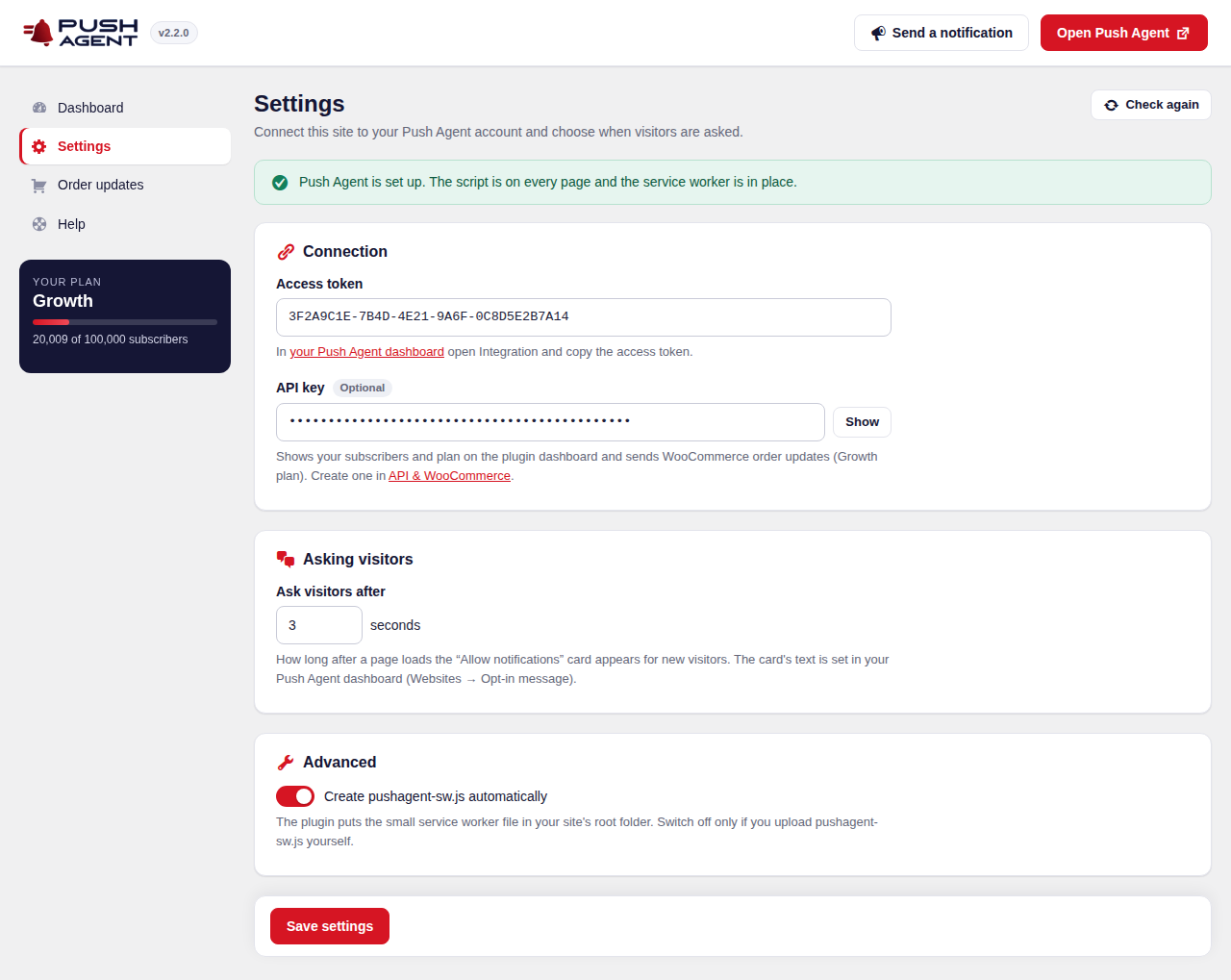
The full guide, including caching plugins and Cloudflare, is here: How to install Push Agent on WordPress.
Note: Using a caching plugin or a CDN? Clear the cache after setting up, so every page includes the new code.
Frequently asked questions
Do I need a plugin to add push notifications to WordPress?
A plugin is the easiest way, because it adds the code and the service worker for you. You can also add a push service’s code to your theme manually, but a plugin keeps it working through theme changes.
Is there a free WordPress push notification plugin?
Yes. Push Agent, OneSignal, Webpushr and PushAlert all have free plans with unlimited notifications, with different subscriber limits. Perfecty Push is free and self-hosted.
Will a push notification plugin slow down my site?
A well-built push plugin loads one small script asynchronously, so it doesn’t block your page from loading. Push Agent’s script loads with the async attribute.
Can I use a push notification plugin with WooCommerce?
Yes. Push Agent sends WooCommerce order status updates on the Growth plan, and several other plugins offer shop automations on paid plans.
Can I run two push notification plugins at the same time?
It isn’t recommended. Each plugin registers its own service worker, and they can conflict. Pick one and remove the other.